
Mobile access
Mobile sign-in for your team
A shared tablet in the cab. A personal phone in your pocket. Let authorised people record their arrival and departure without a separate trip to the reception screen.
Watch EntryPath in action
A quicker stop. The same clear record.
See shared-tablet and personal-phone sign-in across two sites.
Read the walkthrough
- On a registered shared tablet, identify yourself with your ID and PIN.
- Choose from the locations your organisation has enabled.
- Confirm your arrival only when safely parked.
- A clear confirmation records the site and sign-in time.
- When leaving, the same screen offers Sign out.
- Attendance updates without another trip back to reception.
- Personal phones are also supported, with access controlled by your organisation.
- On an approved personal phone, your identity is already linked.
- Travelling between sites? Select the location you have arrived at.
- Confirm your arrival. Reception has the same up-to-date attendance record.
Less walking. Clearer attendance.
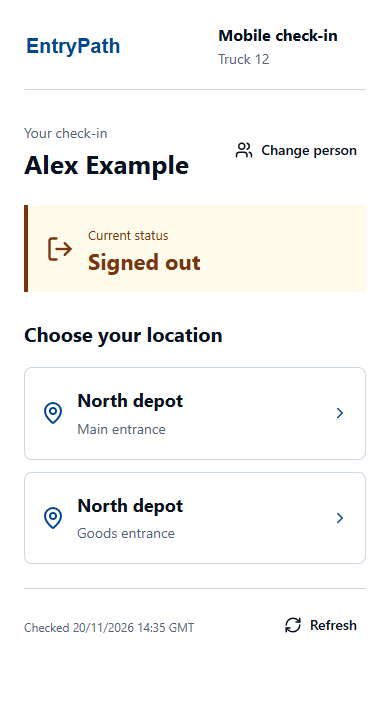
Your location.
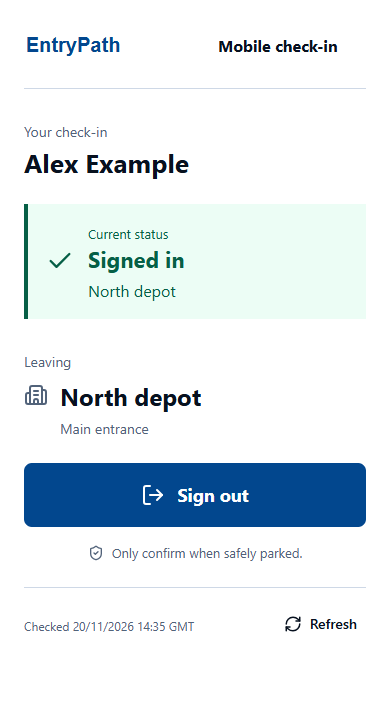
Your next action.
For drivers making several stops or teams working across sites, signing in should fit the working day.
- Choose where you areClear location buttons show the places you are authorised to use.
- Confirm your arrivalSelect Sign in. Your attendance joins the same on-site register used by reception.
- Sign out when you leaveYour current status and a clear Sign out button make the next step easy to see.
Use only when safely parked. A working internet connection is required.
Simple for the team. Managed by you.
Get a whole team ready.
Set up people and devices in batches instead of repeating the same task for everyone. Keep the locations, groups and sign-out rules that work for your organisation.
Explore multi-site management- Less repetitive setup
- Create mobile access in bulk with individual six-digit PINs. Download the new access details as a CSV to distribute securely.
- The right places for each person
- Choose who can use mobile access, which locations they can use and whether shared devices, personal devices or both are available.
- Control when things change
- Revoke a lost device or remove mobile access without losing the person's attendance history.
- One attendance picture
- Mobile check-ins feed the on-site register and attendance reports. Your existing group sign-out restrictions still apply.
Your questions
The practical details.
Can drivers use a tablet that stays in the truck?
Yes. Register it as a shared mobile device and give each authorised person their own access ID and PIN. They choose the location and confirm Sign in or Sign out while safely parked.
Can someone visit several sites in one day?
Yes. They can choose from their authorised locations, sign out when leaving one site and sign in on arrival at the next. See multi-site management.
Does mobile access track people automatically?
No. People choose the location and confirm their arrival or departure. Mobile access does not track GPS locations or sign people in automatically.
Do we have to replace our reception kiosks?
No. Mobile access is optional. Keep kiosk name search and optional QR passes for the people who prefer or need them. Explore staff sign-in options.
What happens without an internet connection?
A connection is needed to confirm attendance. If it is unavailable, use your site's alternative sign-in procedure rather than assuming an arrival or departure has been recorded.
See mobile access for your team.
Walk through shared devices, personal phones and the locations your people visit.